AI-generated people can sometimes look unnatural, especially in the face, movement and scenery.
01Start with a good image
The video is based on the image you give the model, so start with an image that already looks realistic.
Look for:
Natural skin
Keep normal skin texture instead of overly smooth skin.
Natural lighting
Make sure the light and shadows look consistent.
A believable setting
Use a real-looking room, street, shop, or other environment.
Natural details
Hair, clothes, and other small details should look believable.
Before turning the image into a video, check it carefully. Fix anything that already looks wrong.
02Describe the action clearly
Instead of filling your prompt with things you don’t want, describe exactly what the person should do.
Less useful
“Don't look at the camera. Don't move strangely. Don't make a fake smile.”
Better
“She looks at the ring on her hand, turns it slowly, and smiles naturally.”
The second prompt clearly tells the model what should happen.
Also describe the important parts of the shot:
Action: what the person is doing
Place: where they are
Camera: how the camera moves
Light: what the lighting looks like
Keep the prompt focused. You don’t need a long description for every small detail.
03Putting it together
1
Start with a realistic image.
2
Describe one clear action.
3
Keep the scene simple.
4
Check the result and adjust the prompt if needed.
You don’t need a complicated prompt. A good starting image and a clear description of the shot are a good place to start.
04An example
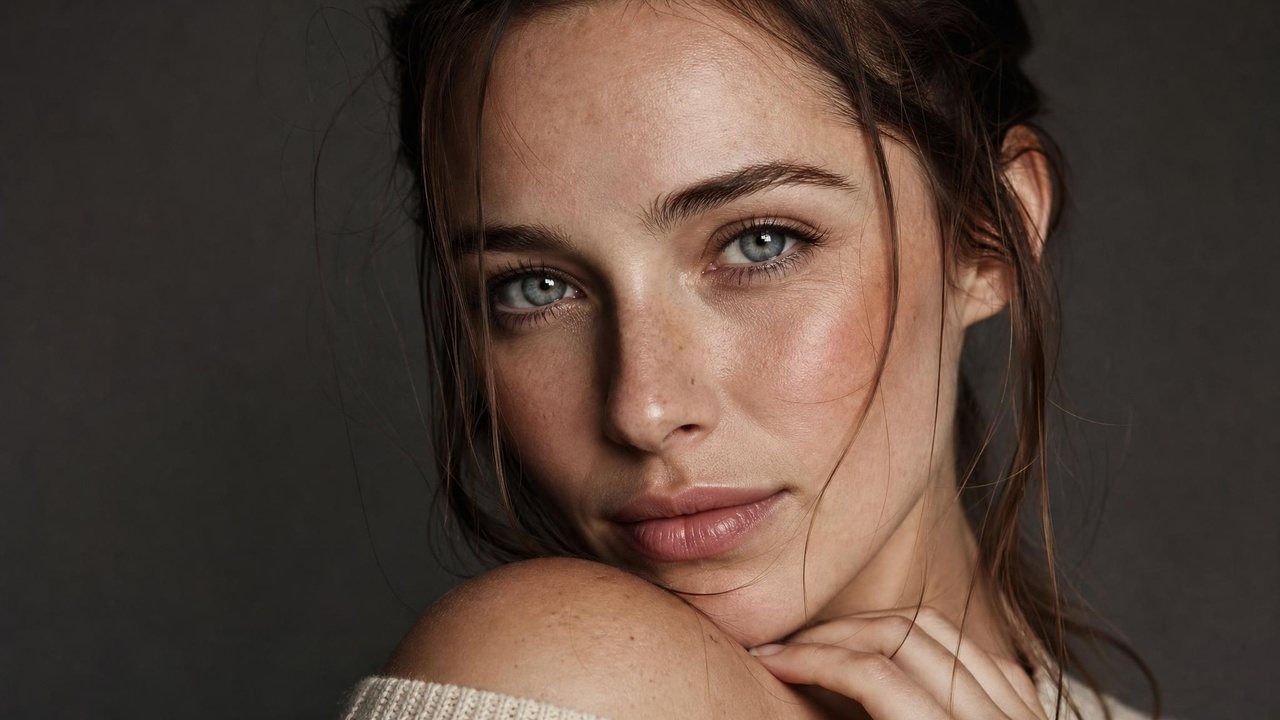
This portrait started as a realistic image. A second prompt then describes small, natural facial movements, and Adreelo turned the two into a 10-second video. Both prompts are below, exactly as used.
01
Start with a realistic image
Image prompt
Create an ultra-photorealistic close-up beauty portrait of a young adult woman. Frame her from the upper shoulders upward, with her face occupying most of the frame. Her head is turned slightly toward the camera in a natural three-quarter pose, while her eyes look directly into the lens with a calm, confident expression.
She has light fair natural skin with extremely realistic texture: visible pores, subtle peach fuzz, tiny freckles, faint fine lines, natural tonal variations, realistic under-eye texture, and small imperfections. Her skin should look completely authentic and unretouched, never plastic, waxy, airbrushed, or overly smooth.
Her eyes are light blue-green with highly detailed irises, realistic moisture, natural catchlights, subtle veins, and believable asymmetry. She has naturally shaped eyebrows with individual hairs, delicate eyelashes, naturally textured lips, and realistic facial proportions.
Her brown hair is loosely tied back, with slightly messy natural styling, individual strands, wispy flyaways, and loose strands falling naturally around her forehead and cheeks. She wears subtle natural makeup with softly defined eyes and lips.
Her hand rests gently near her neck and shoulder, with realistic fingers, nails, skin texture, and anatomy. Her shoulder is naturally visible in the foreground. She is wearing a simple cream knit top.
Use a dark neutral studio background with soft, controlled portrait lighting. A large soft light source illuminates her face from the front-left, creating gentle highlights across the forehead, cheekbones, nose, and lips while maintaining realistic dimensional shadows.
Shot on a professional full-frame camera with an 85mm portrait lens, shallow depth of field, natural optical falloff, realistic skin tones, subtle film grain, high dynamic range, and authentic photographic detail.
The result must look like a genuine high-end beauty photograph of a real person. Remove all text, logos, watermarks, stickers, credits, timestamps, and graphic overlays.
02
Converted into an ad with Adreelo
Video prompt · 16:9 · 10 s
Create a highly photorealistic facial-performance video using the reference image as the exact identity and appearance reference. The woman remains in the same close-up composition and lighting, with her face staying natural and anatomically consistent throughout.
She begins with a calm, neutral expression, then makes subtle, realistic facial movements: slowly blinks once, slightly narrows her eyes, gently raises her eyebrows, relaxes them, gives a very subtle natural half-smile, and then returns to a calm expression. Her eyes make tiny natural movements as if focusing on the camera. Her lips and cheeks move naturally with the expression, with extremely subtle muscle movement around the eyes, eyebrows, nose, and mouth.
Emphasize true human skin realism throughout the motion: visible pores, fine lines, tiny freckles, peach fuzz, subtle redness and tonal variation, realistic under-eye texture, natural skin translucency, slight facial asymmetry, and physically believable skin deformation as the facial muscles move. Preserve the exact facial structure, eye shape, nose, lips, freckles, hair strands, and overall identity from the reference.
Include tiny involuntary movements such as micro-expressions, subtle breathing, slight eye moisture movement, minute eyelid motion, and barely perceptible head movement. Hair strands near her face should respond naturally to the small movements.
The camera remains almost completely steady with a very subtle cinematic push-in. No exaggerated expressions, no beauty filter, no skin smoothing, no plastic or waxy appearance, no face morphing, no identity drift, no artificial eye movement, no exaggerated blinking, no uncanny facial deformation. The final result should look like a real high-end portrait photograph that has been brought to life, with convincing human facial motion and extremely realistic skin texture.